
Platform overview
Platform overview
Databricks Apps, Lakebase Postgres, Agent Bricks, and the Data Lakehouse are the four core workspace services that make up a full-stack Databricks application. Omnigent is where you run the coding agents that build it. The diagram below shows how the services fit together.
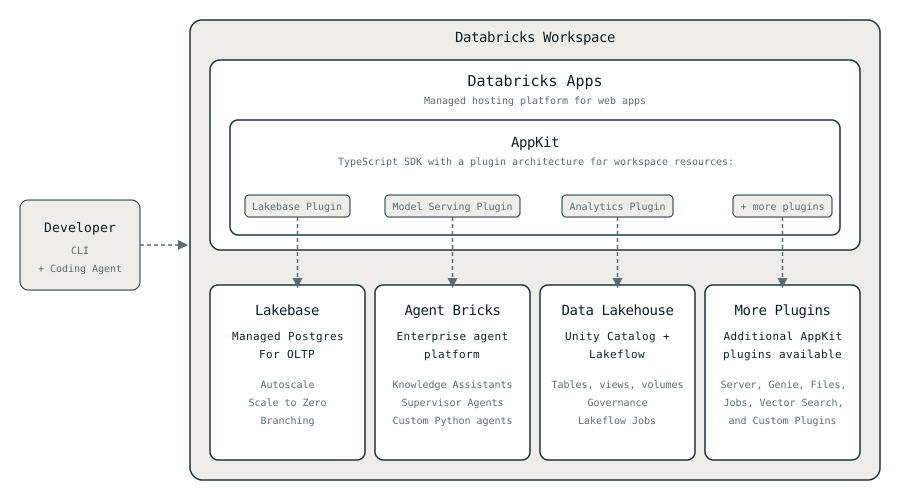
- Databricks Apps: managed hosting for apps you build with AppKit, the TypeScript SDK for production-ready Databricks applications.
- Lakebase Postgres: managed Postgres database for OLTP storage co-located with your workspace data. Use it for sessions, app state, conversation history, or any data your app reads and writes at low latency.
- Agent Bricks: Databricks' enterprise agent platform, unifying model access, execution, governance, and context. Use it to build and deploy standalone agents: chat with your company's docs (Knowledge Assistants), coordinate other agents and tools (Supervisor Agents), or run your own agent code with the Agent Bricks CLI.
- Data Lakehouse: governed analytical data in Unity Catalog. Use it to read company data, trigger Lakeflow Jobs, and display data freshness in your UI.
- Omnigent (Beta): one interface for Codex, Claude Code, Cursor, and other coding agents, signed in with your workspace identity. Use it to build your app with agents that run on a Databricks Sandbox or your own machine.
Which service to use
Each service works on its own, and they combine:
- Building an internal app for your teammates? Use Databricks Apps with AppKit. Users sign in with workspace SSO.
- Need low-latency reads and writes? Use Lakebase Postgres, as your app's database or as a standalone database for any service.
- Want agentic features in your app? Use AppKit's agents plugin. The agent is part of the app: it runs in the same runtime, works on the data your app already has access to, and users talk to it through your app's UI.
- Building a standalone agent? Use Agent Bricks. The Agent Bricks CLI scaffolds a LangGraph or OpenAI Agents project and deploys it on its own, with an HTTP API your apps and services call.
- Need your company's analytical data? Use the Data Lakehouse, from an app or from an agent.
- Building any of this with coding agents? Use Omnigent to run and share coding agent sessions from your browser, desktop, or phone.
How a request flows
- A user opens the app at its workspace URL. Databricks Apps authenticates them via workspace SSO.
- Each AppKit plugin then handles requests for its service: the Lakebase Plugin queries Lakebase, the Model Serving Plugin calls Agent Bricks, the Analytics Plugin reads the Data Lakehouse.
- Each plugin call runs as the app's service principal (by default) or the user's forwarded token (when per-user permissions matter). Workspace permissions and governance apply automatically.
Where to next
- Set up your environment to start building apps.
- Learn what templates are and how they can help you quickly scaffold an app.
- Dive deeper into each service: Databricks Apps, Lakebase Postgres, Agent Bricks, the Data Lakehouse, and Omnigent.